









Native Residential VPN Now Supports Proxy Connections
Your Native Residential VPN plan just got a significant upgrade. Until now, you could only access it through the CometVPN app on iOS, Android, Windows, and Mac. Starting today, you can use the same residential IP technology anywhere proxies are supported — no app required.

Laura Valskytė
2 min read
What Changed
We added a Proxy Generator to the Native Residential VPN dashboard. It gives you a set of connection credentials — host, port, username, and password — that you can copy and paste into any app, browser, or device that supports proxy connections.
The technology is exactly the same. You still get real residential IP addresses from real home connections. The difference is you are no longer limited to our apps to access them.
Why This Matters
A standard VPN routes all your traffic through an encrypted tunnel. That works well for most use cases, but some apps, tools, and devices do not support VPN connections — they support proxies instead.
With proxy credentials from your Native Residential plan, you can now use residential IPs in browsers, anti-detect browsers, automation and testing tools, and any third-party software with a proxy configuration field. Routers and other network devices can also be used, though most need additional software such as redsocks to forward traffic through a proxy. If you want to get started with browser proxy configuration, check out our guide on How to Change Chrome Proxy Settings.
This has been one of the most requested features from our users. A lot of use cases — browser extensions, automation scripts, devices that cannot install apps — simply could not use Native Residential VPN before. That changes today.
What You Need
An active CometVPN Regular VPN base plan with Native Residential VPN is required to access the Proxy Generator. Traffic is billed per GB and never expires, so you only pay for what you use. Pricing starts from $0.70/GB.
How to Get Your Proxy Credentials
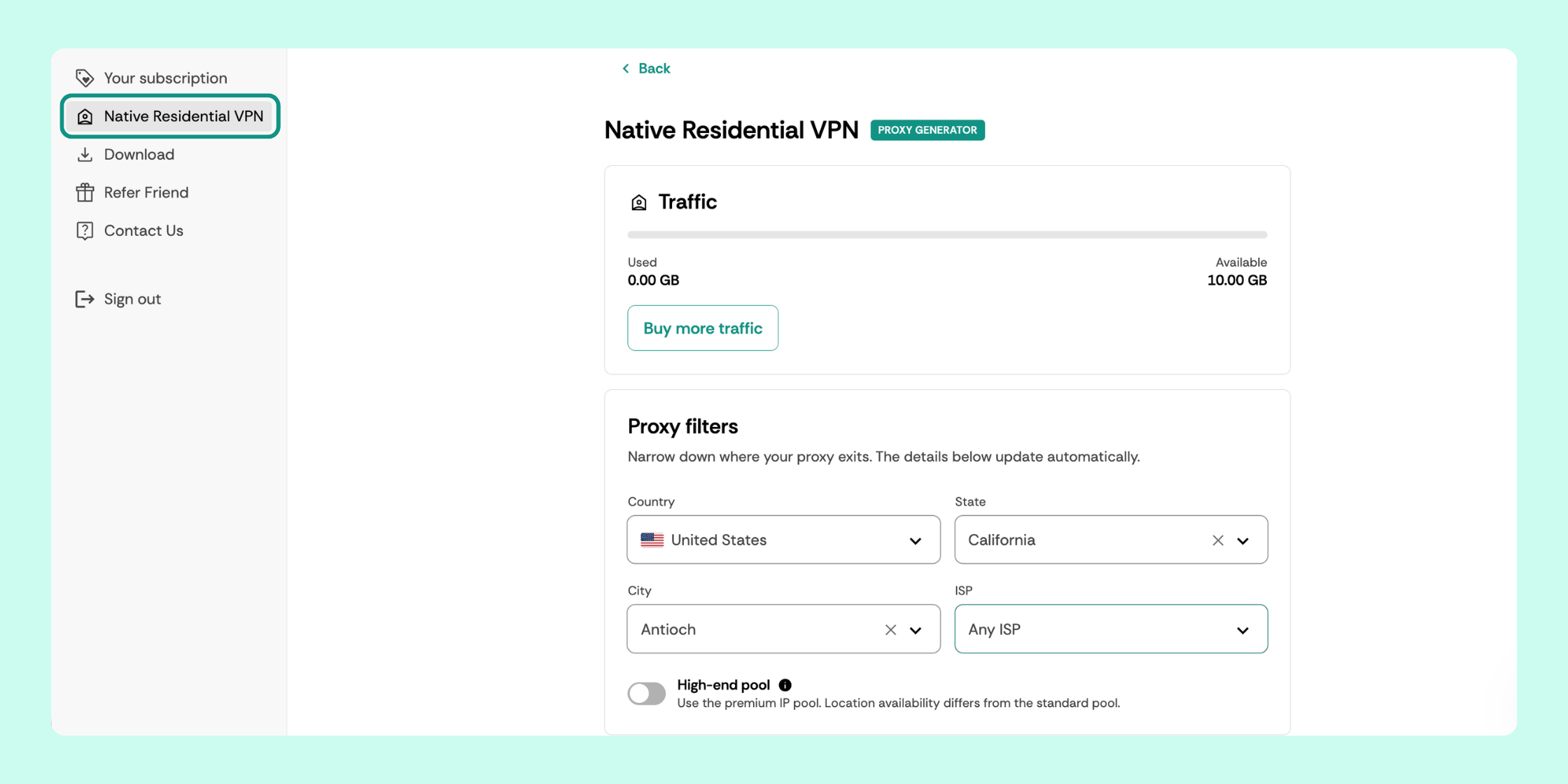
- Log in to your dashboard — you will see Native Residential VPN in the left sidebar
- Click on it to open the Native Residential VPN page
- Under Proxy filters, select your preferred country, state, city, and ISP — your credentials update automatically
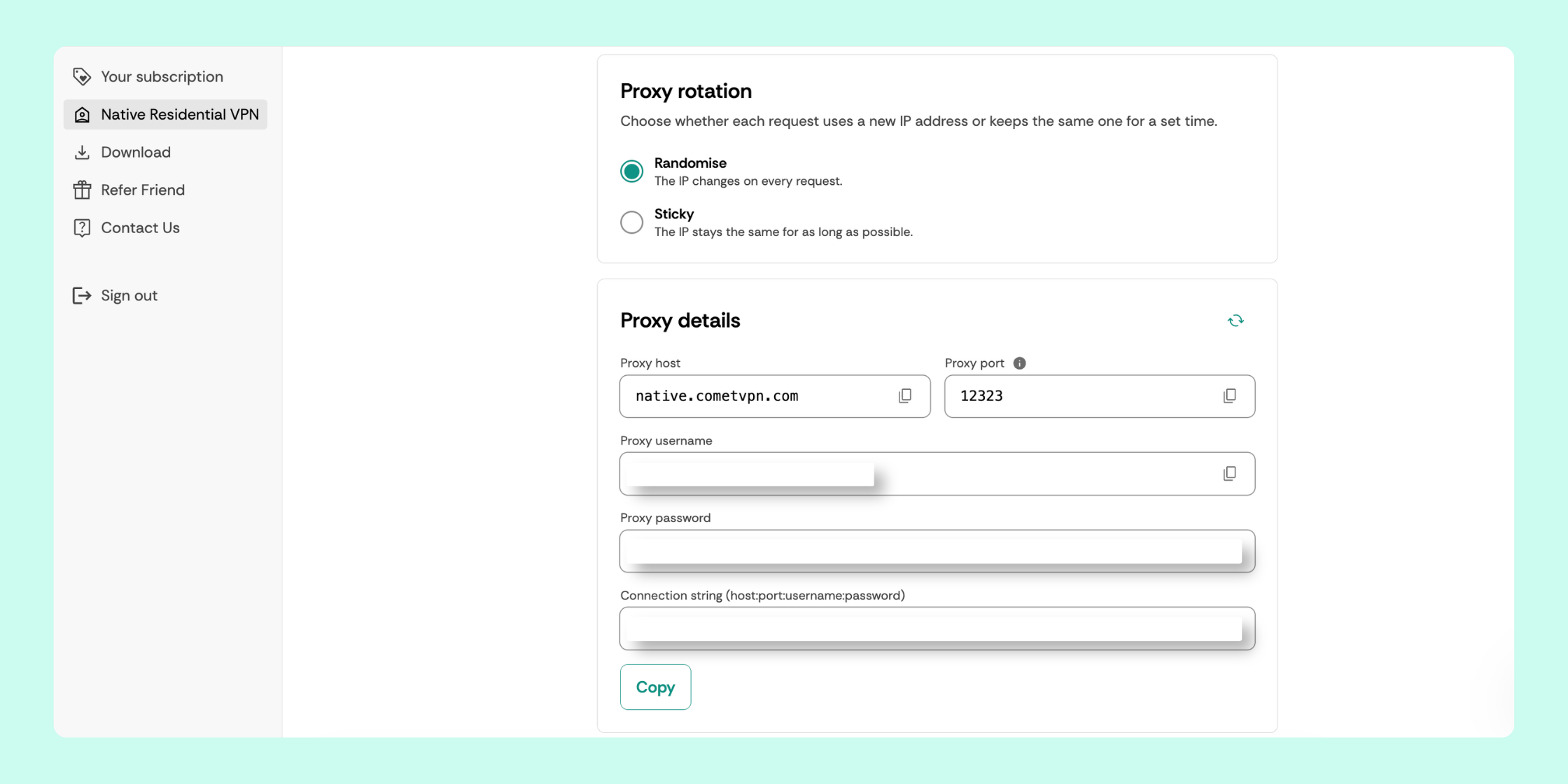
- Under Proxy rotation, choose Randomise (new IP on every request) or Sticky (same IP for as long as possible)
- Under Proxy details, copy your proxy host, port, username, password, or full connection string using the Copy button
Who Is This For
This feature is most useful if you have ever run into a situation where a standard VPN was not enough — websites that detect and block VPN traffic, apps that do not support VPN connections, or devices you cannot install software on.
If you are already using the CometVPN app and it works well for you, nothing changes. You do not need to use proxy credentials if you do not want to.
Do I need a separate plan for proxy access?
No. If you already have a Native Residential VPN plan, proxy credentials are included at no extra cost.
Does using proxies consume my traffic allowance?
Yes — traffic usage is counted the same way whether you connect through the app or through proxy credentials.
Where do I find my proxy credentials?
Log in to your dashboard and click Native Residential VPN in the left sidebar.
Does my traffic expire?
No. Traffic is billed per GB and never expires — you only pay for what you use.
What protocols are supported?
SOCKS5, HTTP, and HTTPS are all supported.
Author
Laura Valskytė
Digital Marketing Specialist at CometVPN
Laura is a digital marketing specialist with a passion for online privacy and cybersecurity. At CometVPN, she focuses on content strategy, SEO, and helping users understand the tools that keep them safe online.
Related articles

4 min read
Ethernet vs Wi-Fi: Which One is Better?
Ethernet and Wi-Fi are the two main ways to connect your computer to the internet. While Wi-Fi has received significantly more attention in recent years, especially among consumers, due to its simplicity and flexibility, ethernet is still widely used in various other applications.
Even if Wi-Fi is significantly more popular, it isn’t strictly better. Both methods have their benefits and drawbacks. Wi-Fi’s popularity comes from its ease-of-use and flexibility, but an ethernet connection can be much more useful in certain scenarios.

Adomas Šulcas

5 min read
How to Change Chrome Proxy Settings: The Ultimate Guide
A proxy server is an easy alternative to a VPN that can perform most of the functions of the latter. It’s a server that stands between your device and the destination server, taking your connection requests and forwarding them in your name.
Destination servers in almost all cases see the proxy server as the originator of the request. As such, proxies are widely used in various, mostly business-related applications whenever privacy, security, location changing, and several other factors are at play.

Guoda Šulcaitė