









Split Tunneling Is Now on CometVPN for Android - Here's How to Set It Up
CometVPN's split tunneling feature for Android lets you choose which apps use the VPN and which connect directly, giving you full control over speed and privacy.

Laura Valskytė
6 min read

Are you tired of choosing between your VPN's privacy protection and your connection speed? With CometVPN's newly launched split tunneling feature for Android, you no longer have to.
Split tunneling is one of the most powerful and most requested — VPN features out there. And as of today, it's available right inside the CometVPN Android app.
What Is Split Tunneling?
Split tunneling is a VPN feature that divides your internet traffic into two separate paths. One path sends your chosen apps or data through CometVPN's encrypted tunnel, keeping them private and secure. The other path lets everything else travel directly through your regular internet connection at full speed.
Think of it like a highway with a private fast lane and a standard lane. Sensitive traffic — like your banking app or work email — gets the private, protected lane. Bandwidth-hungry apps like Netflix or online gaming take the standard lane at maximum speed, with no VPN overhead slowing them down.
How CometVPN's Split Tunneling Works
When you enable split tunneling in the CometVPN Android app, you can choose one of two modes:
Exclusive Mode — Select the apps you want to exclude from CometVPN. Those apps connect directly through your regular internet connection, while everything else is automatically protected by the VPN. Best for users who want broad VPN coverage with only a few exceptions.
Inclusive Mode — Select only the specific apps you want CometVPN to protect. Everything else connects directly. Best for users who want to protect a handful of sensitive apps while keeping the rest of their traffic on their regular connection for maximum speed.
Both modes give you granular, app-by-app control directly from the CometVPN interface — no technical knowledge required.
How to Enable Split Tunneling on CometVPN for Android
Getting started takes less than a minute:
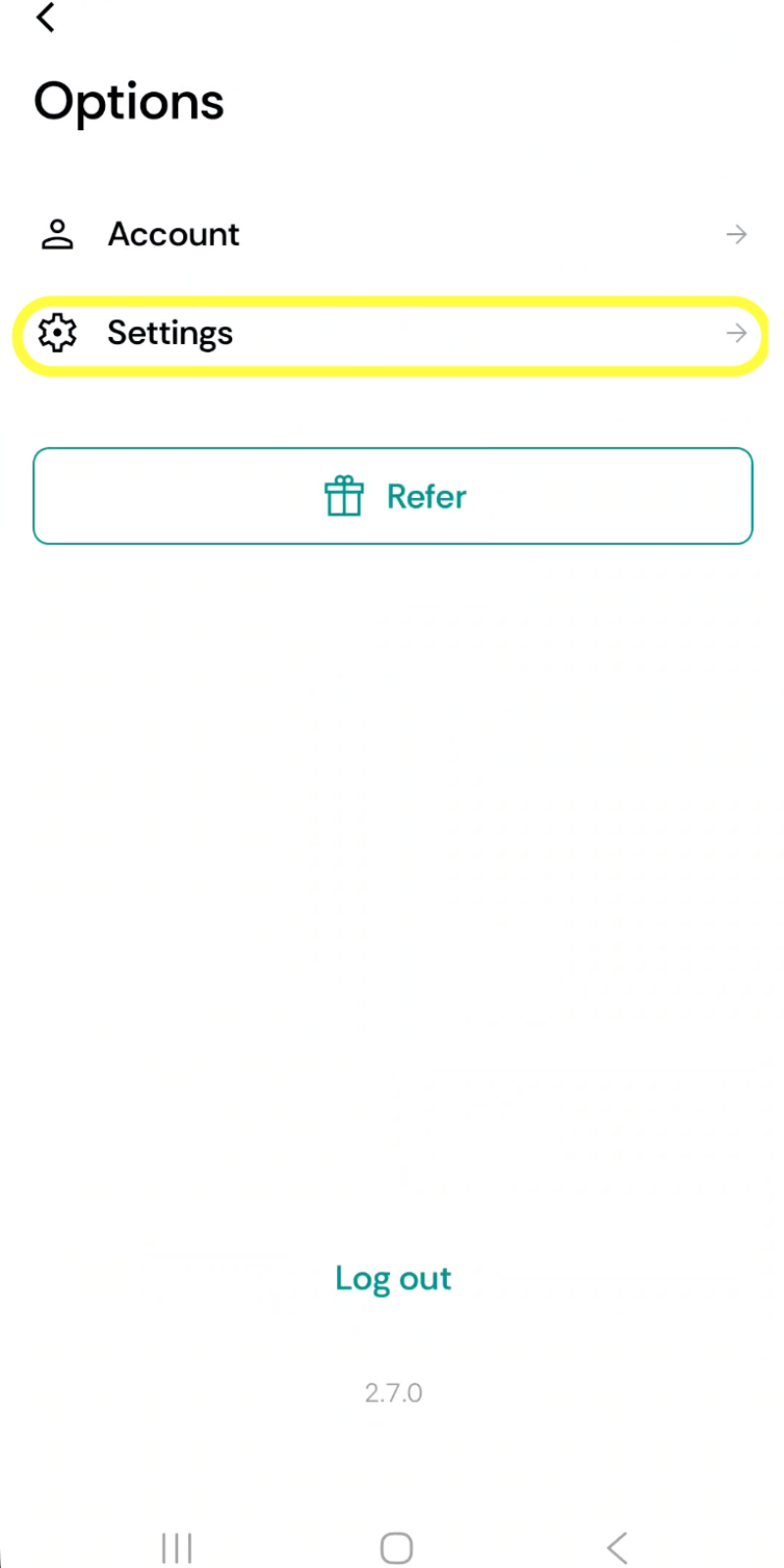
Step 1 — Open Options Tap the menu icon to open the Options screen, then tap Settings.
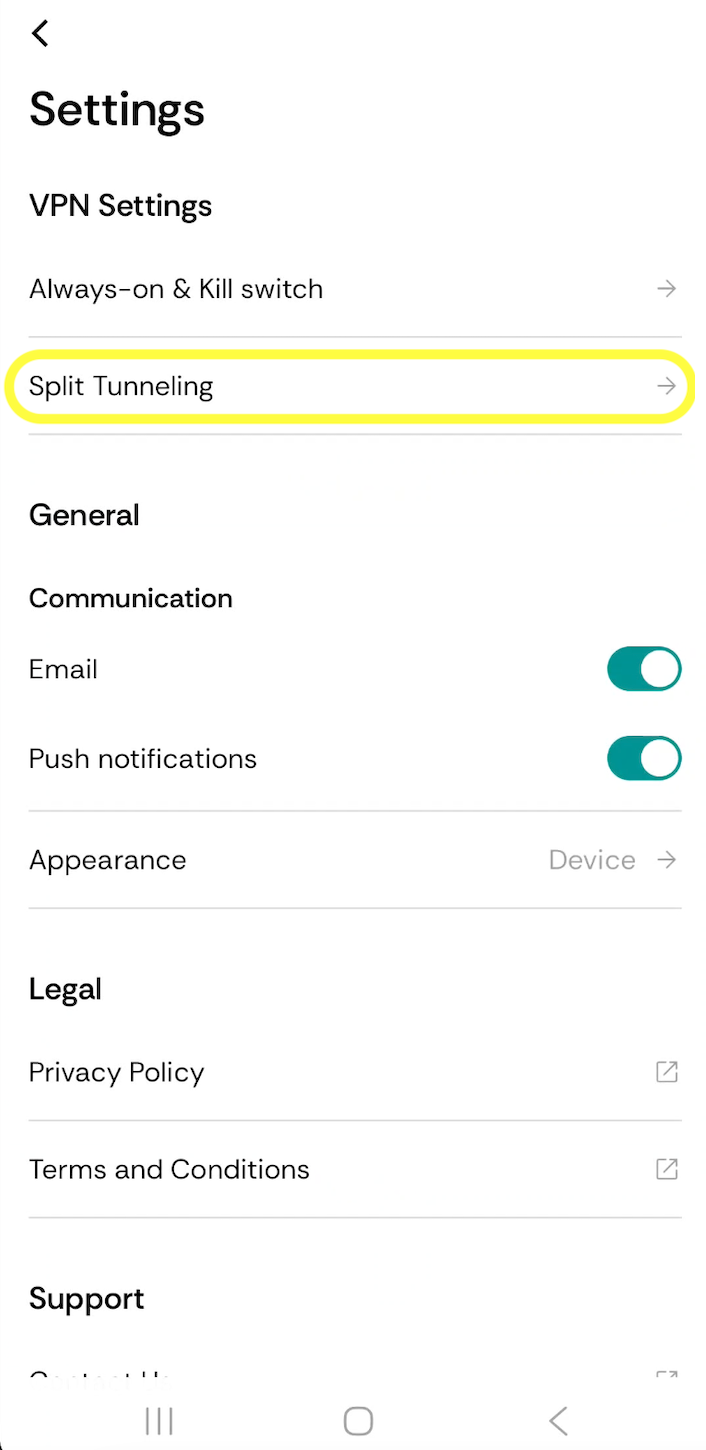
Step 2 — Find Split Tunneling Inside Settings, look under the VPN Settings section. Tap Split Tunneling.
Step 3 — Enable and Configure Toggle Split Tunneling on. Then tap Mode to choose between Inclusive or Exclusive (see below). Finally, scroll down to the Apps list and check the apps you want to apply the rule to.
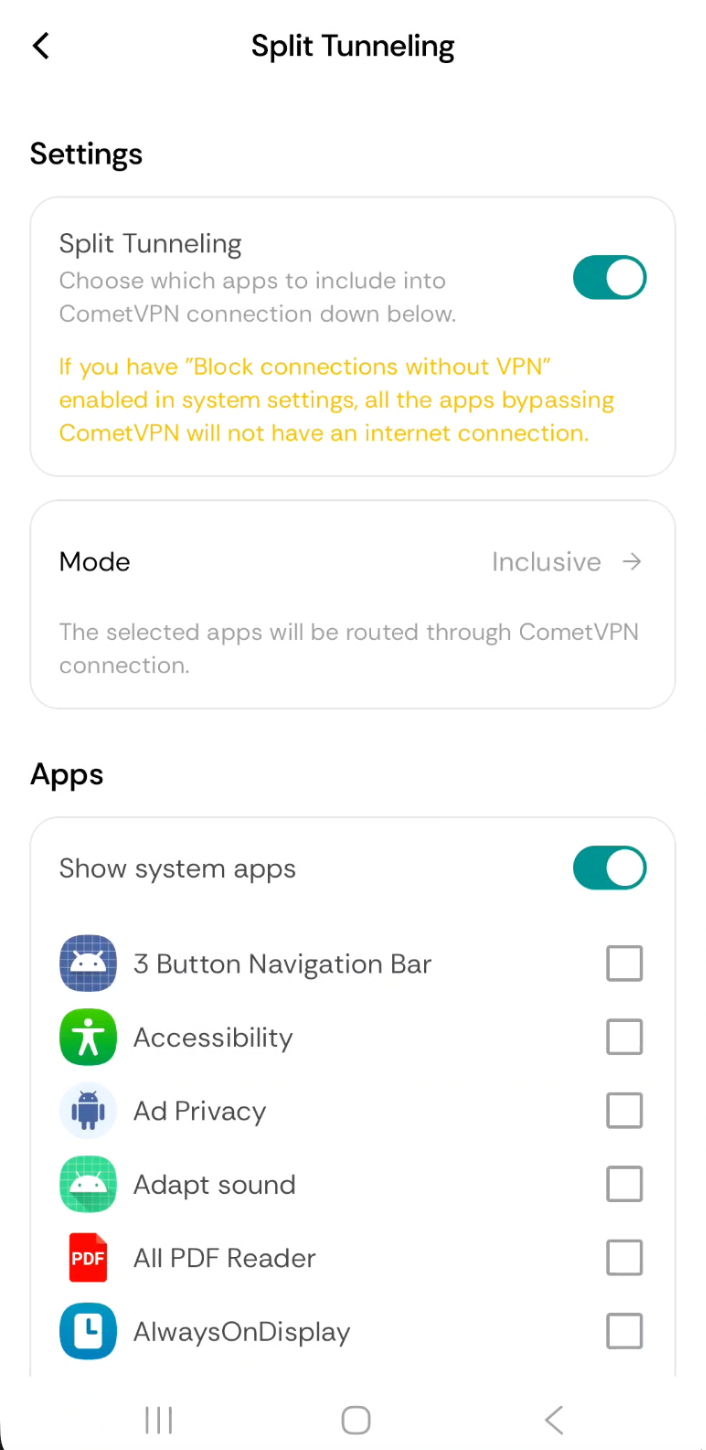
⚠️ Important: If you have "Block connections without VPN" enabled in your Android system settings, any apps bypassing CometVPN will lose internet access entirely. Keep this in mind when choosing which apps to exclude.
Your preferences are saved automatically, so every time you connect to CometVPN, your chosen apps are routed exactly the way you set them up.
5 Real-World Use Cases for CometVPN Split Tunneling
1. Work From Home Without Disruptions
Route your work email, Slack, and corporate tools through CometVPN while keeping Spotify and YouTube on your direct connection. Productivity stays high. Music stays uninterrupted.
2. Access Local Services While Traveling
Abroad and need to use a local food delivery app or check regional news? Keep those apps on your direct connection so they detect your actual location, while CometVPN protects your sensitive browsing in the background.
3. Stream at Full Speed
Streaming platforms perform best on a direct connection. With split tunneling, you can leave Netflix, YouTube, or Twitch on your regular internet speed while your financial apps and messaging tools stay encrypted.
4. Use Your Home Network Devices
Some local network devices — printers, smart home systems, NAS drives — stop responding when all traffic goes through a VPN. Split tunneling keeps local device communication intact without dropping your VPN protection.
5. Gaming Without Lag
Competitive gaming requires low latency. Route your gaming client directly through your ISP while CometVPN keeps everything else locked down. No more choosing between privacy and ping times.
Is Split Tunneling Safe?
Yes — when configured thoughtfully. It's important to remember that apps routed outside the VPN tunnel are not encrypted and will use your real IP address. That's by design for low-risk apps like streaming services.
For anything sensitive — banking, password managers, private messaging, work tools — always keep those routed through CometVPN. Our recommendation: when in doubt, default to protecting the app.
CometVPN's no-logs policy means that even the traffic going through CometVPN's servers is never stored, monitored, or sold. Your privacy is the foundation everything is built on.
Who Should Use Split Tunneling?
Split tunneling is especially valuable for:
- Remote workers who need secure access to company tools while keeping personal apps fast
- Frequent travelers who want to access local services without disconnecting their VPN
- Power users who run bandwidth-intensive apps alongside security-sensitive ones
- Anyone who has ever thought "my VPN is slowing me down" — this fixes that
Frequently Asked Questions
Does split tunneling slow down my VPN?
Actually the opposite — split tunneling speeds things up. By routing only selected apps through CometVPN, there's less traffic on the encrypted tunnel, which means faster speeds overall.
What apps should I put in split tunneling?
A good rule of thumb: route security-sensitive apps through CometVPN (banking, email, messaging, work tools) and leave bandwidth-heavy apps on your direct connection (streaming, gaming, music). If you're unsure about an app, default to routing it through CometVPN.
Can I change my split tunneling settings while connected to CometVPN?
Yes. You can update your app selections at any time. Changes take effect immediately without needing to reconnect.
Does split tunneling work with streaming services like Netflix?
Yes. In fact, streaming is one of the best use cases for split tunneling. By routing Netflix, YouTube, or Spotify outside the VPN, you get full local speeds with no buffering — while your sensitive apps stay protected in the background.
Which mode should I choose — Inclusive or Exclusive?
It depends on how many apps you want protected. If you want most of your traffic through CometVPN with just a few exceptions (like a streaming app), use Exclusive Mode. If you only want to protect a small number of sensitive apps and keep everything else on your direct connection, use Inclusive Mode.
Available Now on Android
CometVPN's split tunneling feature is available today for all users on Android 9.0 and above. No extra setup needed — just update your app, head to Settings → VPN Settings → Split Tunneling, and you're good to go in under a minute.
Already a user? Update My App →
New to CometVPN? Download on Google Play →
Author
Laura Valskytė
Digital Marketing Specialist at CometVPN
Laura is a digital marketing specialist with a passion for online privacy and cybersecurity. At CometVPN, she focuses on content strategy, SEO, and helping users understand the tools that keep them safe online.
Related articles
4 min read
Ethernet vs Wi-Fi: Which One is Better?
Ethernet and Wi-Fi are the two main ways to connect your computer to the internet. While Wi-Fi has received significantly more attention in recent years, especially among consumers, due to its simplicity and flexibility, ethernet is still widely used in various other applications.
Even if Wi-Fi is significantly more popular, it isn’t strictly better. Both methods have their benefits and drawbacks. Wi-Fi’s popularity comes from its ease-of-use and flexibility, but an ethernet connection can be much more useful in certain scenarios.

Adomas Šulcas

5 min read
How to Change Chrome Proxy Settings: The Ultimate Guide
A proxy server is an easy alternative to a VPN that can perform most of the functions of the latter. It’s a server that stands between your device and the destination server, taking your connection requests and forwarding them in your name.
Destination servers in almost all cases see the proxy server as the originator of the request. As such, proxies are widely used in various, mostly business-related applications whenever privacy, security, location changing, and several other factors are at play.

Guoda Šulcaitė